
TL;DR
Growing an Instagram email list starts with public data and a repeatable process.
- Review the Instagram bio and contact options
Check bios, Contact buttons, and linked websites for publicly listed emails.
- Use Business Dolphin Radar for structured discovery
Scale email collection by identifying Instagram accounts and surfacing public business emails in a compliant workflow.
- Use AI tools to support research and validation
Apply AI to suggest formats and cross-check findings, not to replace verification.
With the right structure, Instagram can support long-term, compliant email list growth.
Why You Should Build an Instagram Email List
Instagram is effective for discovery, but it is not an owned channel. Visibility depends on algorithms, formats, and timing—factors you don’t control. An email list gives you direct access to your audience without relying on platform distribution.
Email also supports more structured communication. Unlike direct messages, it allows clear context, follow-ups, and integration with existing sales or marketing workflows. This makes email a more reliable channel for professional outreach and long-term engagement.
Key reasons to build an Instagram email list
- Own the relationship
Email contacts remain accessible regardless of changes to Instagram’s feed or reach policies.
- Increase consistency and deliverability
Email provides more predictable visibility compared to organic social posts.
- Enable structured outreach
Emails fit naturally into CRM systems, sales pipelines, and partnership workflows.
- Support long-term growth
A well-maintained email list compounds in value over time, rather than resetting with each post.
In practice, Instagram works best as a discovery layer, while email becomes the channel for sustained communication and conversion.
What to Know Before Building an Instagram Email List
Before building an Instagram email list, it’s important to set realistic expectations.
Email collection is governed by platform rules and privacy regulations, and any sustainable strategy must operate within those limits.
Platform-level restrictions
Instagram tightly controls access to user data. There is no official way to retrieve private contact information.
- All activity must comply with the Instagram Platform Terms and Instagram Data Use Policy
- Unauthorized scraping, data harvesting, or attempts to bypass privacy settings are prohibited
- Private accounts and hidden contact fields are not accessible
What data can be used
Only information users have chosen to make public can be collected and processed.
- Emails shown in profile bios or via the Contact button
- Emails published on linked websites or public pages
- No inferred, guessed, or reverse-engineered contact details
Legal and regulatory boundaries
Email collection and outreach must also align with applicable data protection laws.
- GDPR requires a legitimate business purpose, transparency, and opt-out options
- CAN-SPAM and similar frameworks govern identification and unsubscribe practices
- Compliance is an operational baseline, not an optional step
Business Dolphin Radar data scope
Business Dolphin Radar is designed to work within these constraints.
- Uses publicly available Instagram signals only
- Does not access private profiles or restricted data
- Avoids inference or enrichment beyond what users disclose
Not every Instagram account will have a public email. That limitation is expected and should be accounted for in any responsible workflow.
Methods to build your Instagram email list
Building an Instagram email list is not about using every method at once.
It’s about choosing the right approach based on visibility, scale, and intent.
In practice, most successful teams rely on a three-layer model:
- Open-source capture — collect emails users clearly choose to share
- Structured Instagram discovery — scale list building with defined criteria
- Research and validation support — improve coverage and accuracy
Each layer plays a different role. The sections below follow this progression.
Layer 1: Open-source capture methods
This layer focuses on email addresses that Instagram users explicitly choose to make public.
It is the most transparent and compliant way to start building an email list, though it remains limited in scale.
Review the Instagram profile and linked assets
What it does
Collects emails that users openly publish on Instagram or on assets directly connected to their profiles.
How to use it
Begin with what the profile owner has chosen to disclose, then expand only when necessary.
1. Review the bio
Scan the bio for any listed email address or explicit contact reference.
2. Check the Contact option (mobile)
On business and creator accounts, use the Contact button to see whether an email is provided.
3. Visit the linked site
Follow the bio link and look for emails on the contact page, about section, footer, or press page.
4. Respect the boundary
If no email appears across these surfaces, treat it as intentional and move on without inference.
Pros
- Very high accuracy
- Fully transparent and compliant
- No tools or automation required
Cons
- Coverage depends on user disclosure
- Manual and time-intensive
- Not suitable for scalable list growth
Best for
- High-value or priority accounts
- Early-stage list building
- Validating contacts before deeper discovery
Layer 2: Structured Instagram discovery
Use Business Dolphin Radar for scalable email discovery
What it does
Business Dolphin Radar identifies Instagram accounts based on defined criteria and surfaces publicly available business email addresses in a repeatable workflow.
How to use it
- Select an Instagram-native targeting dimension, such as location, keywords, hashtags, or audience relationships.
- Enter a specific filter (for example, a city, niche keyword, or hashtag).
- Set the number of Instagram profiles to collect for the run.
- Generate a qualified list of public Instagram accounts.
- Identify profiles that display public business email addresses and prepare them for outreach or list enrollment
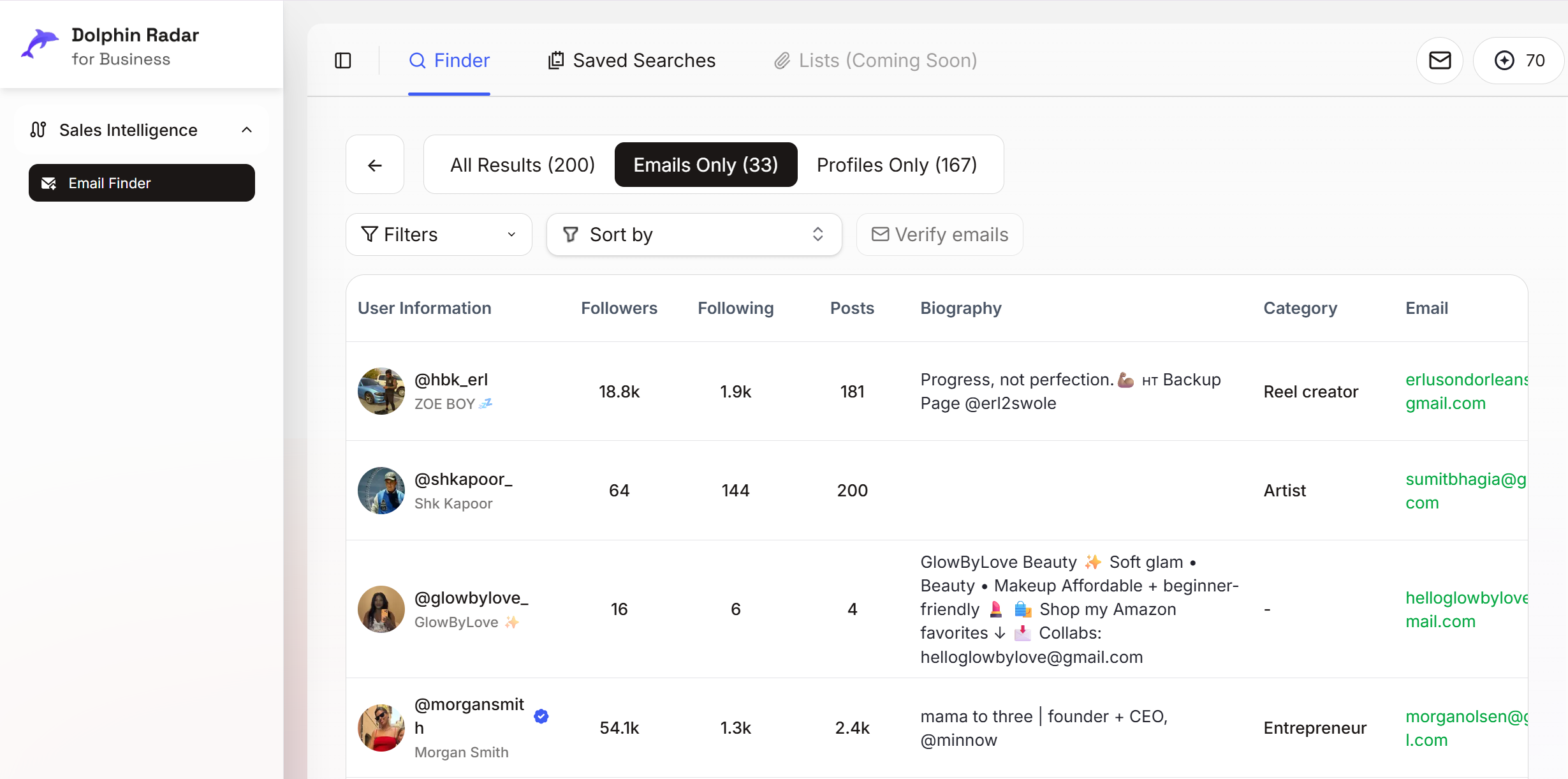
This process replaces manual profile-by-profile review with structured discovery.
Pros
- Designed specifically for Instagram-first workflows
- Scales efficiently beyond manual research
- Consistent results through defined targeting criteria
- Compliance-first, using public data only
Cons
- Limited to accounts with public signals
- Not applicable to private profiles or hidden emails
Best for
- Teams growing Instagram email lists at scale
- Ongoing acquisition and outreach programs
- Sales, growth, and partnership teams
Layer 3: Research and validation support
Even with structured discovery, not every Instagram account will surface an email.
This layer exists to support decisions, validate findings, and improve accuracy, rather than to drive discovery on its own.
Use external signals to refine and verify results
What it does
Strengthens your email list by cross-checking public information and validating contact details found through earlier layers.
How to use it
- Review connected social profiles
Check platforms like LinkedIn, X, or YouTube, where users often publish professional contact details more explicitly.
- Run focused Google searches
Use combinations of names, usernames, and domains to confirm whether an email is publicly indexed elsewhere online.
- Apply AI tools for validation
Use AI to suggest likely email formats, summarize public context, or flag inconsistencies—then confirm results manually.
These actions should always rely on public data and be used selectively, not exhaustively.
Pros
- Improves coverage when emails are not immediately visible
- Helps validate accuracy before outreach
- Reduces uncertainty and duplication
Cons
- Manual and time-intensive
- Results depend on the individual’s public footprint
- Not suitable as a primary discovery method
Best for
- Supporting Layer 1 and Layer 2 outcomes
- Validation before outreach or list enrollment
- Quality control in ongoing workflows
Ethical use guidelines
Beyond platform rules and legal requirements, building an Instagram email list also requires responsible use.
- Respect user intent
If an email is not shared publicly, treat that absence as a deliberate choice.
- Use emails for relevant communication only
Limit outreach to clear business, partnership, or professional contexts.
- Avoid volume-first tactics
Prioritize relevance and clarity over mass outreach.
Ethical use protects deliverability, brand reputation, and long-term list value—especially when scaling.
Key takeaways
Building an Instagram email list is most effective when approached as a system, not a set of shortcuts. Combining manual capture, structured discovery, and validation ensures better accuracy while staying aligned with platform rules and user intent.
For teams using Instagram at scale, tools like Business Dolphin Radar help standardize this process by focusing on Instagram-native signals and publicly available data, turning email collection into a repeatable and compliant workflow.
FAQ
How do you build an email list from Instagram?
Use public signals like profile bios, Contact buttons, and linked websites, then scale with structured discovery tools.
Can Instagram give you followers’ email addresses?
No. Instagram does not provide access to private email data. Emails must be shared publicly or collected via opt-in.
Is it legal to collect emails from Instagram?
Yes, if you only use publicly available information and comply with laws like GDPR and CAN-SPAM.
What’s the fastest way to grow an Instagram email list?
Manual methods work for small volumes, but scaling requires structured tools like Business Dolphin Radar.
Do Instagram email tools work on private accounts?
No. Reputable tools only surface emails from public profiles and linked public sources.
Can AI help with Instagram email discovery?
AI can support research and validation, but it cannot access private data or replace verification.
Author: Business Dolphin Team
Last updated: January 2026