TL;DR
There are three practical ways to find an email associated with an Instagram account in 2026.
The right approach depends on scale, accuracy requirements, and workflow maturity.
- Manual checks (best for one-off research)
Review the Instagram profile, bio, and linked website to locate publicly shared contact details. This approach is accurate but time-intensive and difficult to scale.
- Business Dolphin Radar (best for structured, Instagram-first workflows)
Designed specifically for Instagram discovery, Business Dolphin Radar helps teams define target accounts, correlate public signals, and surface associated business emails in a repeatable, compliant process.
- Third-party email tools like Hunter.io (best for domain-based lookup)
Tools such as Hunter.io work well when a domain is known, helping identify possible email patterns and publicly indexed addresses, but they are not Instagram-native.
Most teams start with manual checks, adopt Business Dolphin Radar as volume grows, and use third-party tools selectively for validation or domain-level research.
Why find an Instagram account’s email?
Instagram is optimized for discovery, not for structured business communication.
For B2B teams, email remains the most reliable channel to initiate and manage professional conversations. It supports clearer context, better tracking, and established workflows that direct messages cannot easily replace.
Finding an email associated with an Instagram account enables teams to:
- move conversations off-platform
- formalize outreach and follow-ups
- integrate Instagram-sourced leads into CRM and sales processes
In 2026, this practice is less about aggressive outreach and more about qualified contact, relevance, and operational efficiency.
Privacy and compliance considerations
Before finding or using an email associated with an Instagram account, it’s essential to understand the regulatory and platform-level boundaries.
- Publicly available information only
Email discovery should rely exclusively on data users have chosen to make public, whether on Instagram or elsewhere online.
- Legitimate business purpose
Outreach must serve clear professional use cases such as sales, partnerships, or business communication, not unsolicited or deceptive contact.
- Instagram platform policies
All activity should comply with Instagram’s official rules, including the Instagram Platform Terms and Instagram Data Use Policy.
- No access to private or restricted accounts
Private profiles, hidden emails, and non-public data must not be targeted or inferred.
- Data protection regulations
Outreach should follow applicable laws such as GDPR, CAN-SPAM, and other regional privacy frameworks governing electronic communication.
Professional tools designed for Instagram discovery—such as Business Dolphin Radar—operate within these constraints by correlating public signals and avoiding unauthorized data access.
Method 1: Manual checks on Instagram and connected profiles
How it works
This method relies on reviewing information the account owner has chosen to make public.
- Check the profile bio for listed email addresses or contact details.
- Use the “Contact” button (on mobile) to view email contact on business or creator accounts.
- Check other social platforms or websites linked from the profile for published contact information.
- Send a direct message (DM) to request the preferred email for business inquiries, when appropriate.
Pros
- High accuracy when email information is publicly shared
- No tools or automation required
- Fully compliant with platform and privacy standards
Cons
- Time-intensive and manual
- Results vary significantly by account setup
- Not suitable for large-scale or recurring discovery
Best for
- One-off research
- High-value or priority accounts
- Early-stage validation before outreach
Method 2: Use Business Dolphin Radar for Instagram-first discovery
How it works
Business Dolphin Radar replaces ad hoc profile checks with a controlled discovery flow.
A typical workflow includes:
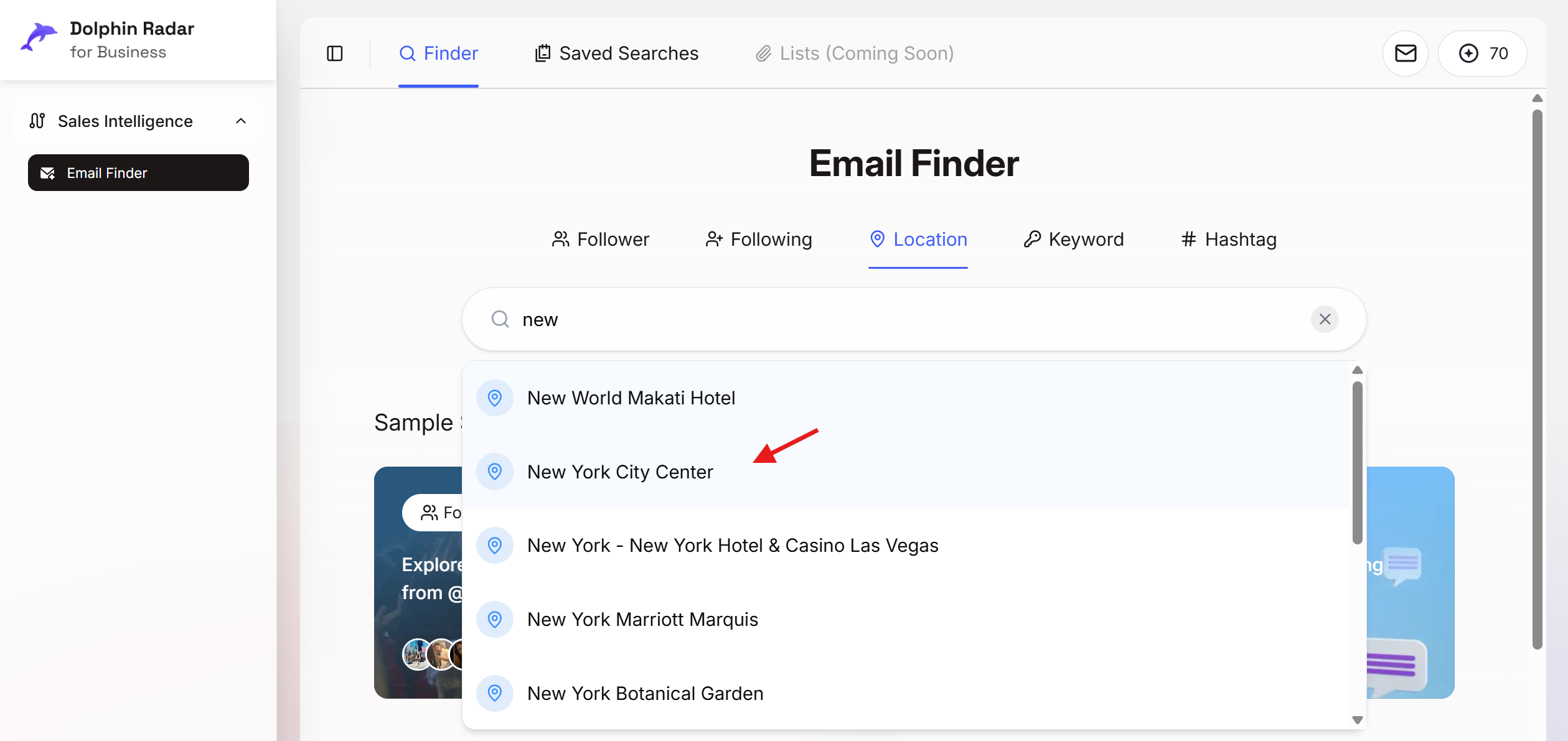
- Choose a targeting dimension, such as Location, and enter a defined area (e.g., New York City center).
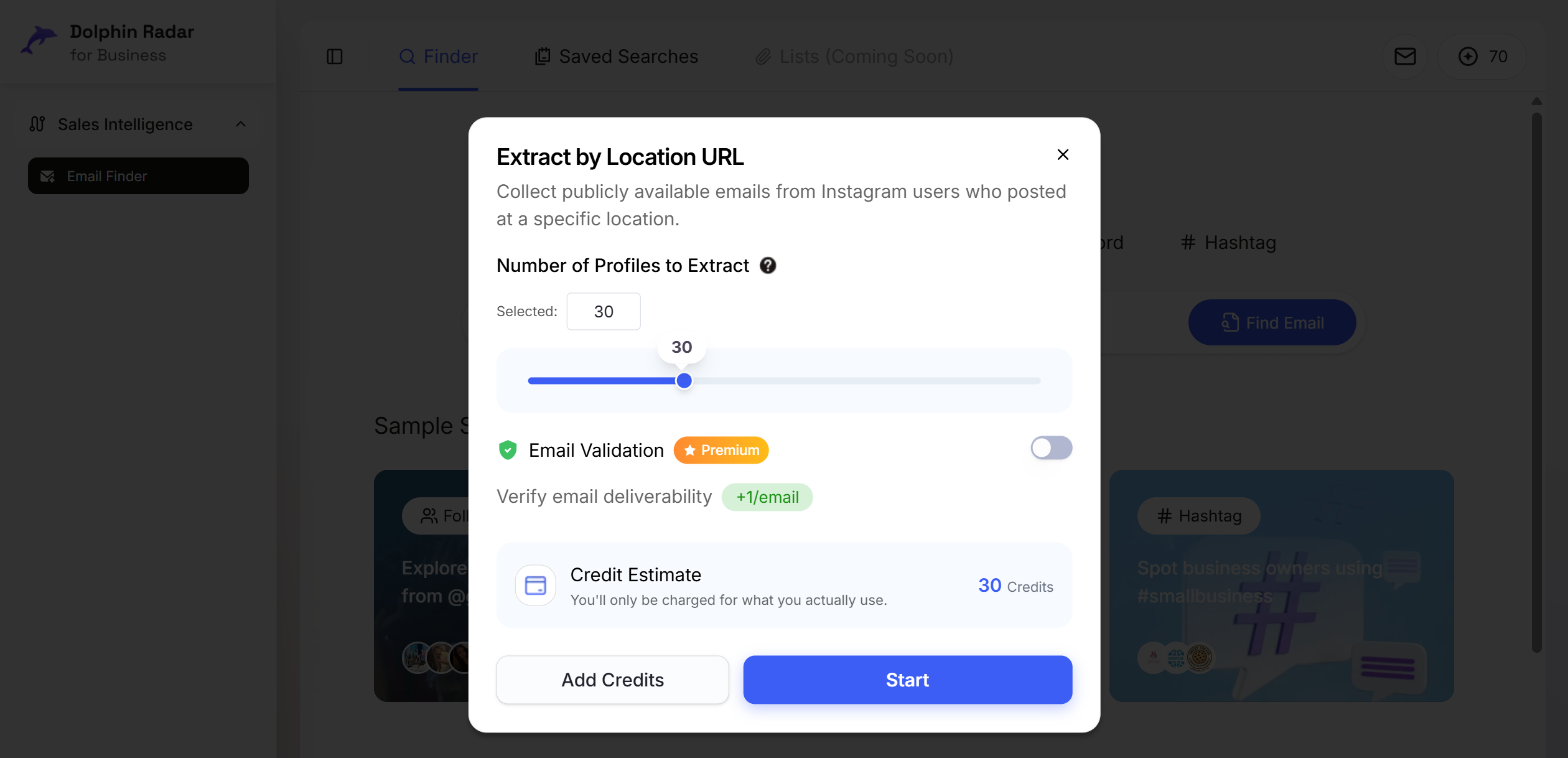
- Set the number of Instagram profiles to collect for the run (for example, 30 profiles).
- Generate a qualified list of profiles based on the selected criteria.
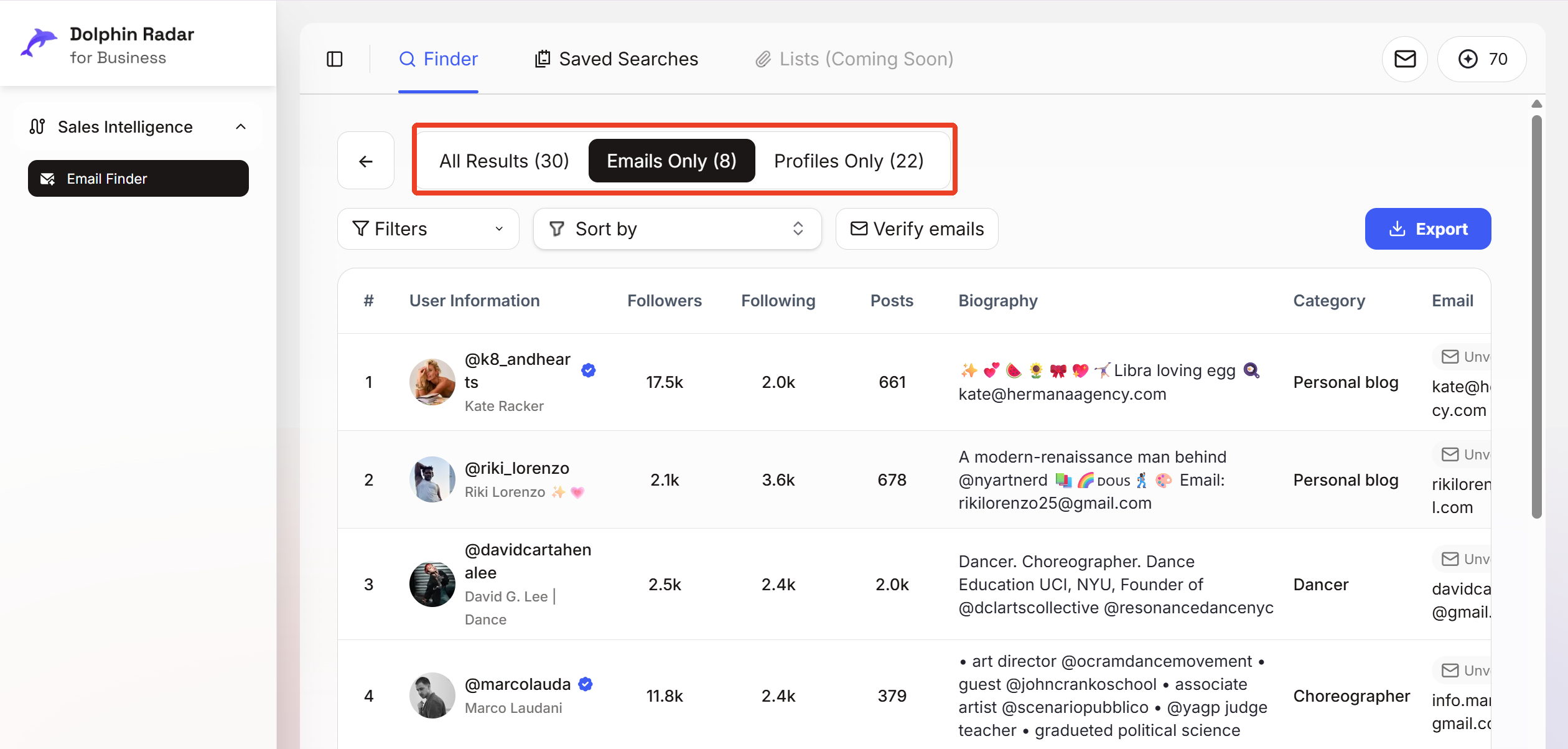
- Review the list and isolate accounts with publicly available email addresses for outreach.
This method standardizes discovery while keeping all activity within public data boundaries.
Key capabilities include:
- Verified email discovery from public Instagram profiles
- High-intent account identification for sales, partnerships, and outreach
- Bulk export support for CRM and outreach tools
- Public-data-only operation aligned with platform and privacy rules
Pros
- Built specifically for Instagram discovery workflows
- Scales efficiently across large account sets
- Higher consistency through structured targeting and validation
- Compliance-first, relying only on public data
Cons
- Limited to accounts with public signals
- Not intended for private profiles or hidden contact details
Best for
- Teams sourcing leads from Instagram at scale
- Ongoing prospecting and repeatable workflows
- Sales, partnerships, and growth teams requiring accuracy and compliance
Method 3: Use third-party email tools like Hunter.io
How it works
Third-party email tools such as Hunter.io focus on domain-based email discovery, rather than Instagram-native signals.
A typical workflow includes:
- Identify a company or personal website linked to the Instagram profile.
- Enter the domain into the tool to view publicly indexed email addresses or common email patterns.
- Validate potential emails before outreach.
This method works best when the Instagram account is clearly tied to a known domain.
Pros
- Effective for domain-based email lookup
- Useful for validating or confirming existing contact information
- Works well alongside other discovery methods
Cons
- Not designed for Instagram-first discovery
- Limited when no website or domain is available
- Does not identify Instagram accounts or intent on its own
Best for
- Domain-level email research
- Email validation and confirmation
- Supporting, rather than replacing, Instagram-native discovery workflows
Comparison: Email discovery methods for Instagram
| Dimension | Manual checks | Business Dolphin Radar | Hunter.io |
|---|---|---|---|
| Discovery focus | Profile-level | Instagram-first | Domain-first |
| Uses Instagram signals | Limited | Yes | No |
| Requires known domain | No | No | Yes |
| Scalability | Low | High | Medium |
| Accuracy | High (manual) | High (verified public data) | Medium (pattern-based) |
| Workflow type | Ad hoc | Structured & repeatable | Standalone lookup |
| Best suited for | One-off research | Ongoing Instagram prospecting | Email validation & support |
| Compliance model | Public data | Public data, compliance-first | Public web indexing |
| Typical users | Individuals | Sales, GTM, growth teams | Ops / support |
How to read this table
- Choose manual checks when volume is low and precision matters.
- Choose Business Dolphin Radar when Instagram is a core acquisition channel and scale is required.
- Use Hunter.io as a supporting tool for domain-based lookup and validation.
Most mature teams combine all three — with Business Dolphin Radar as the central discovery layer.
GDPR and Legal Considerations for Instagram Email Extraction
Finding emails associated with Instagram accounts requires more than technical accuracy.
It requires compliance with data protection laws and platform rules.
Work with public data only
Under GDPR and similar privacy frameworks, email discovery should be limited to information that users have clearly and intentionally made public. This includes emails shown on Instagram profiles, linked websites, or other public pages. Private accounts, hidden data, or inferred contact details must not be used.
Establish a legitimate interest
Email outreach must serve a legitimate business purpose, such as sales, partnerships, or professional communication. Broad, irrelevant, or misleading outreach increases legal exposure and undermines any lawful basis for processing personal data.
Align with Instagram’s platform policies
All discovery and outreach activities must comply with Instagram’s official rules, including the
Instagram Platform Terms and Instagram Data Use Policy.
Unauthorized scraping, data misuse, or attempts to bypass platform restrictions introduce significant risk.
Apply core GDPR principles
When operating in GDPR-regulated regions, teams should follow key principles:
- Purpose limitation – collect and use data only for a defined business reason
- Data minimization – process only what is necessary
- Transparency – clearly explain who you are and why you are reaching out
- Right to object – provide a simple way to opt out
Build compliance into the workflow
Risk is lowest when compliance is embedded in the process, not added afterward.
Professional tools such as Business Dolphin Radar reduce exposure by relying solely on public data, avoiding private account access, and supporting structured, auditable discovery workflows.
In 2026, compliant email discovery is not optional.
It is the baseline for sustainable Instagram-based outreach.
Key takeaway
In 2026, successful Instagram email discovery depends on process rather than quick fixes. Consistent outcomes come from working with public data, selecting the right discovery approach, and operating within clear platform and regulatory boundaries.
For teams using Instagram as a core acquisition channel, solutions like Business Dolphin Radar help standardize discovery by replacing manual effort with a compliant, Instagram-first workflow built on public signals. When email discovery is approached as an operational system instead of a one-off action, Instagram can support long-term, qualified business outreach.
FAQ
Can you really find an email associated with an Instagram account?
In many cases, yes, when the account owner has chosen to share it publicly. Emails may appear on the profile, linked websites, or other public platforms, but Instagram itself does not expose private contact details.
Is it legal to extract emails from Instagram accounts?
Email discovery is generally permitted when it relies on publicly available information and serves a legitimate business purpose. All outreach should also comply with data protection regulations and Instagram’s platform policies.
What’s the most reliable way to find Instagram emails in 2026?
Manual checks work for individual cases, but reliable results at scale usually require structured workflows. Instagram-first tools like Business Dolphin Radar help centralize discovery using public signals while maintaining compliance.
Do Instagram email finder tools work for private accounts?
No. Reputable tools operate only on public data and cannot access private profiles or hidden contact information.
What if an Instagram account doesn’t show an email?
When no email is visible, the next step is to check linked websites or other social platforms. If no public contact information exists, outreach should generally be avoided.
Can I automate outreach after finding the email?
Automation can be effective when combined with email validation, segmentation, and compliance safeguards. Sending fewer, relevant messages typically performs better than high-volume outreach.
Author:
Business Dolphin Team
Last updated:
January 2026